Call or email our helpful team on 01392 271739 or hello@quickprint.co.uk


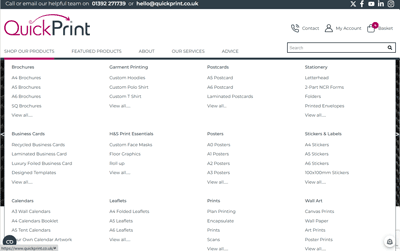
Select Your Products
Use our ‘Shop Our Products‘ mega-menu or simply type what you need into the search bar.
If you can’t see what you’re looking for, please drop us a line with your specification and we can either point you in the right direction or provide a bespoke quote.
Please remember, we do have an in-house Design Studio who can complete your artwork for you. Send us a brief and we can advise the amount of artwork time required.
TIP: Some products may have a different title for what you need, for example, A4 leaflets and posters are the same product with different material choices!

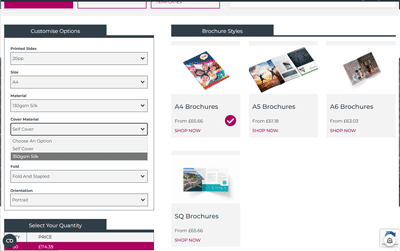
Choose your options and Quantities
On each product page there are generally multiple options to consider and select before the pricing table updates. For example, the material, single sided or double sided print and any finishing.
Once the selections have been made choose your desired quantity and ‘ADD TO BASKET‘
TIP: You can type in any custom quantity over the minimum rather than using the default quantities into the box at the bottom – due to the algorithms, sometimes more is less!

ready to Go...
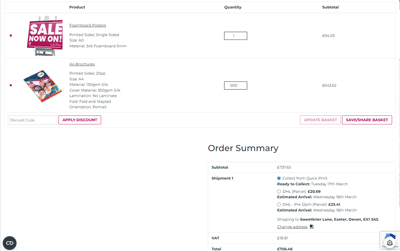
When you have all of the items you would like added to the basket, you can view them and the totals by clicking ‘BASKET‘ on the top right of the screen.
In the basket view you can add any promotional codes in the ‘APPLY DISCOUNT‘ box and share the products selected with another person by various methods.
Towards the bottom, you can select to ‘COLLECT FROM QUICKPRINT‘ at our Marsh Barton offices or choose to have your order couriered to you or another address*.
TIP: Toggle the quantities and update the basket to see the small price changes to have a few more!

Checking out
When you are happy to checkout, click onto ‘PROCEED TO CHECKOUT‘.
This page will provide you with a space to add any order notes, set up an account and add contact information.
Having an account makes it easy to track your orders. You can view the status, locate your invoice or reorder. If you choose to set up an account, an automated email will send you a temporary password.
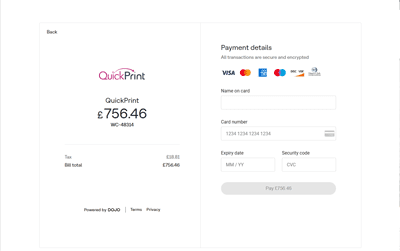
When the form is complete, click ‘PLACE ORDER‘. This will open the payment window (Dojo).
Complete the boxes:
TIP: This is where you need to include any specific notes or add a different shipping address. After this stage the order cannot be edited.

Adding Artwork
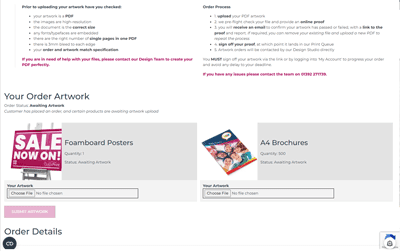
When your order is complete, the next page you view is ‘Thank you For Your Order‘.
There are bullet points advising artwork requirements. It is important your artwork is the size of the product you have ordered.
Under each product icon is a ‘BROWSE‘ box to click and add your print ready PDF.
When all products have a piece of artwork attached ‘SUBMIT ARTWORK‘ and the preflight and proofing process will begin.
When the proof and report is ready to view an automated email will be sent to confirm – usually within 5-10 minutes.
TIP: There is a 50mb limit to PDF uploads. If your file is larger than this, please send a WeTransfer link on an email, with your order number, to hello@quickprint.co.uk.

Signing off Your Proof
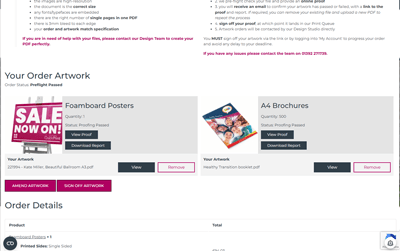
For your order to progress, the artwork needs to be signed off.
When you view your report in Acrobat Reader the issues will be highlighted as bookmarks. In the main, issues are related resolution, colour modes or sizing.
If you need to upload a new file, click onto ‘AMEND ARTWORK‘ and ‘REMOVE‘ the required file. This will allow you to browse to the new PDF, upload and resubmit. All files will then run through the preflight process again.
To avoid any delays, it is very important you ‘SIGN OFF ARTWORK‘.
When signing off, our automated process moves the PDF into the print queue, ready for production.
TIP: The proof you see will be as the file is printed, check it carefully! If you have resolution issues but would like to accept a lower quality print, this can be done at your own risk.

And it's over to us...
Now you can put the kettle on!
Leave us to produce your order – we will be in touch if we have any questions.
Once the order is complete you will receive an email. This means you can collect during our opening hours or the courier will deliver the next working day.
TIP: If you haven’t already found it, you can locate your invoice in ‘MY ACCOUNT‘. This is also where you can order more of the same in the future.

Thank you for you order
* not all products are available for delivery. Please see our terms and conditions regarding third party deliveries.